

Spot Copy Trading Guide for Elite Traders on Bitget Website
[Estimated reading time: 7 mins]
This article provides a complete overview of spot copy trading for elite traders on Bitget. It covers how spot copy trading works, how assets are handled, how to become an elite trader, how trades are copied, how profit sharing is calculated, how to manage your strategy in the Elite Trader Center, and what may cause copy trading failures.
What is Spot Copy Trading?
Spot copy trading is a feature that allows elite traders to share their trading strategies with a wider audience. Once you're listed as an elite trader, copiers can automatically copy your trades in real time. You act as the signal provider, while the system handles the copying logic and asset execution for your copiers.
Elite traders benefit from this model by:
-
Earning passive income through profit sharing
-
Growing their influence and visibility in the Bitget community
-
Creating a long-term income stream based on consistent performance
How are Assets Managed in Spot Copy Trading?
To ensure independence between the trader and the follower’s capital:
-
Each follower has a dedicated copy trading account
-
Copy trading accounts are separate from main accounts
-
Minimum copy amount: 50 USDT
Asset handling logic:
-
When you open a position, the system mirrors the trade for each eligible follower
-
Only trades in supported spot pairs are copied
-
Trades must meet the minimum order value per pair
-
Profits from copy trades are automatically settled based on the High Water Mark model
Note: If the trade value is too low, or slippage limits are breached, the trade may not be copied.
How to Become an Elite Trader on Bitget Website?
To qualify as an elite trader on Bitget, you must complete account verification (KYC)
Step 1: Go to the Spot Copy Trading page
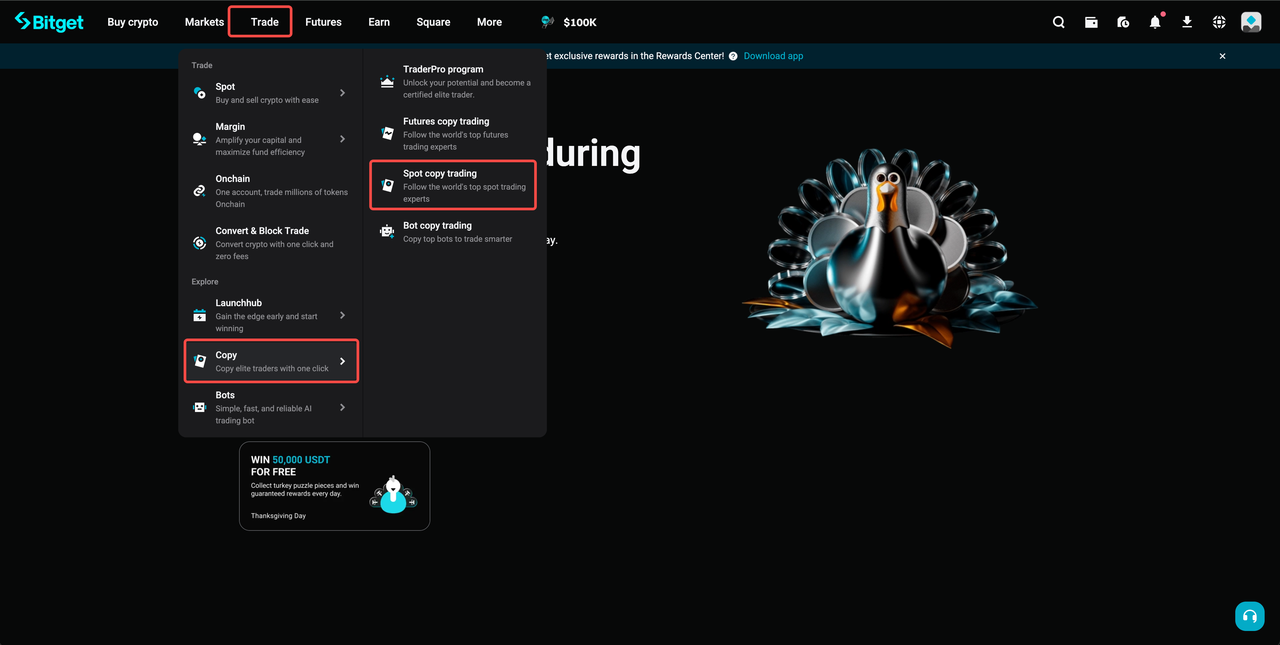
1. Go to Trade > Copy > Spot copy trading
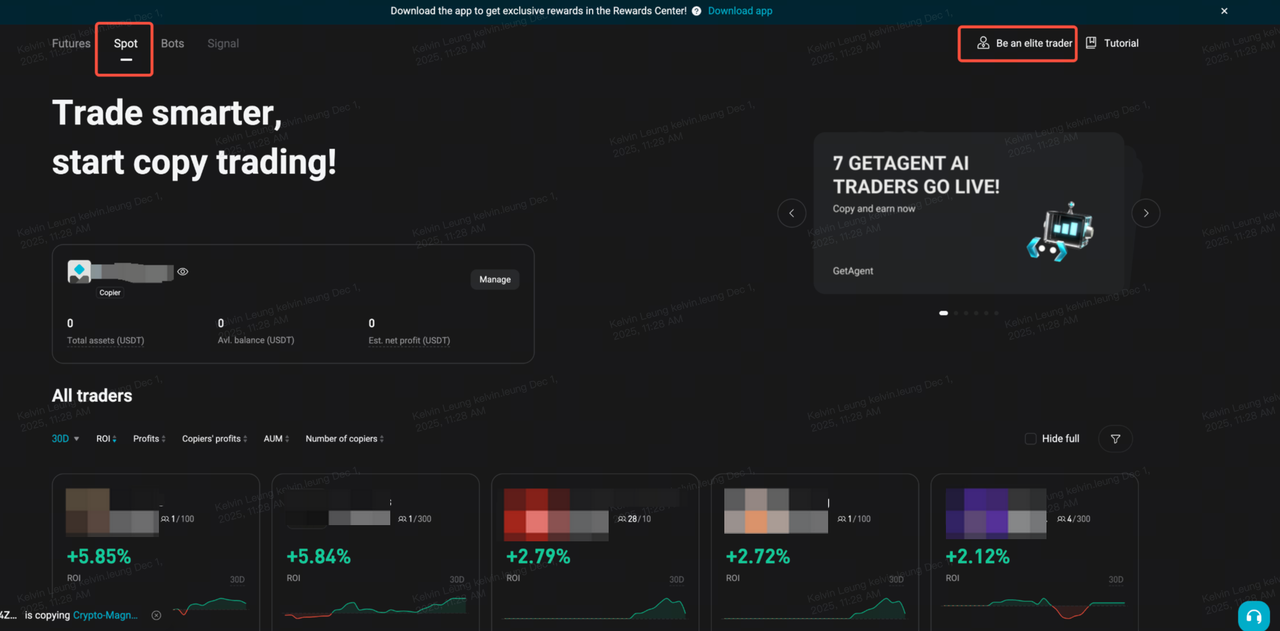
2. On the upper-right corner, select Be an elite trader.
Step 2: Submit your application
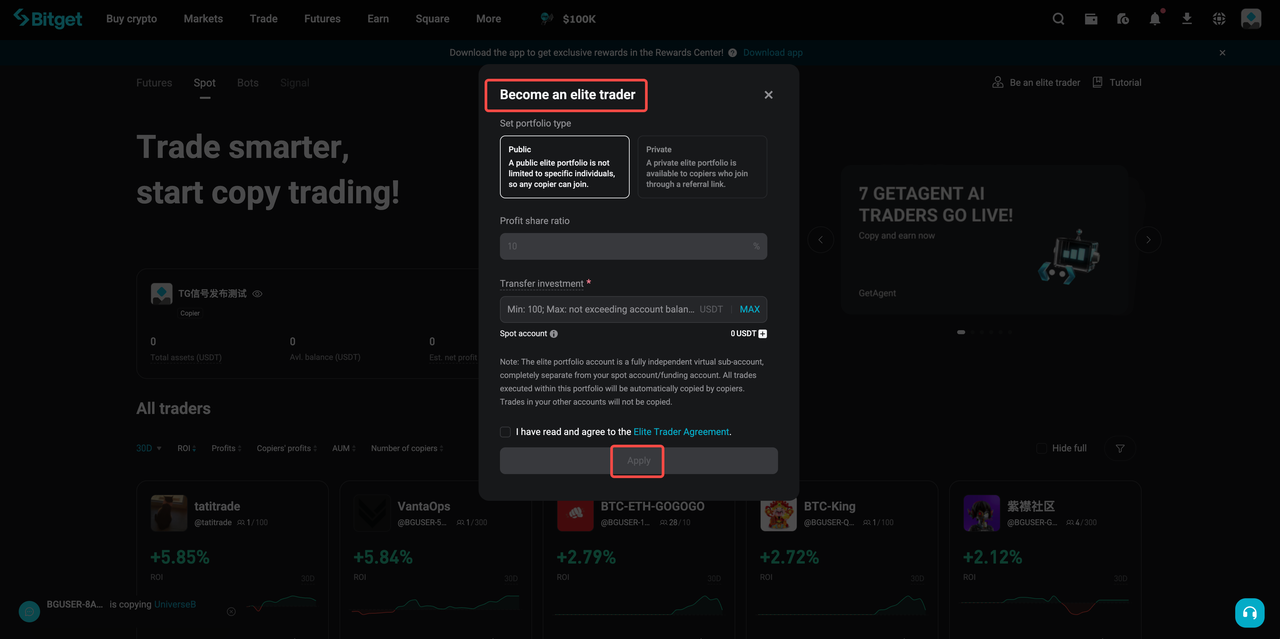
1. Choose your portfolio type:
-
Public: Any copier can copy your trades.
-
Private: Only copier with your referral link can copy your trades.
2. Set a profit share ratio (e.g., 10%).
3. Transfer a minimum investment amount (at least 100 USDT).
4. Tick the checkbox to agree to the Elite Trader Agreement.
5. Click Apply to submit your application.
Step 3: Start your journey as an elite trader
1. Your profile will appear in the elite trader list on the Spot Copy Trading page.
2. Copiers can start copying your trades
3. You’ll gain full access to the Elite Trader Center where you can:
4. Track copier performance
5. Adjust your profit-sharing terms
6. Manage your copy trading portfolio
How to Conduct Spot Copy Trading as an Elite Trader on Bitget?
Once approved as an elite trader, you’ll gain access to a dedicated Spot Copy Trading Zone. Only trades placed in this zone will be copied by your copiers, while your personal trades in the main spot account remain unaffected.
Step 1: Access the Spot Copy Trading Zone
1. Go to Trade > Copy > Spot copy trading
2. Click Manage on your portfolio to open the Elite Trader Center page.
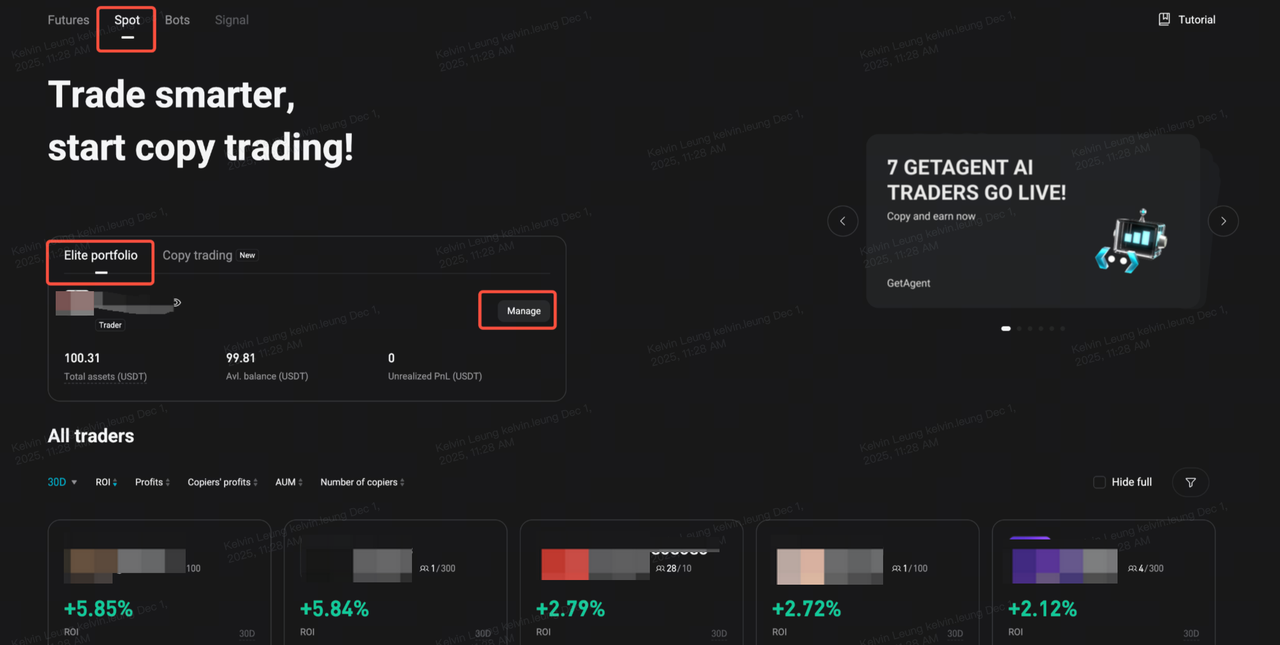
3. Click the Trade button on the right side.
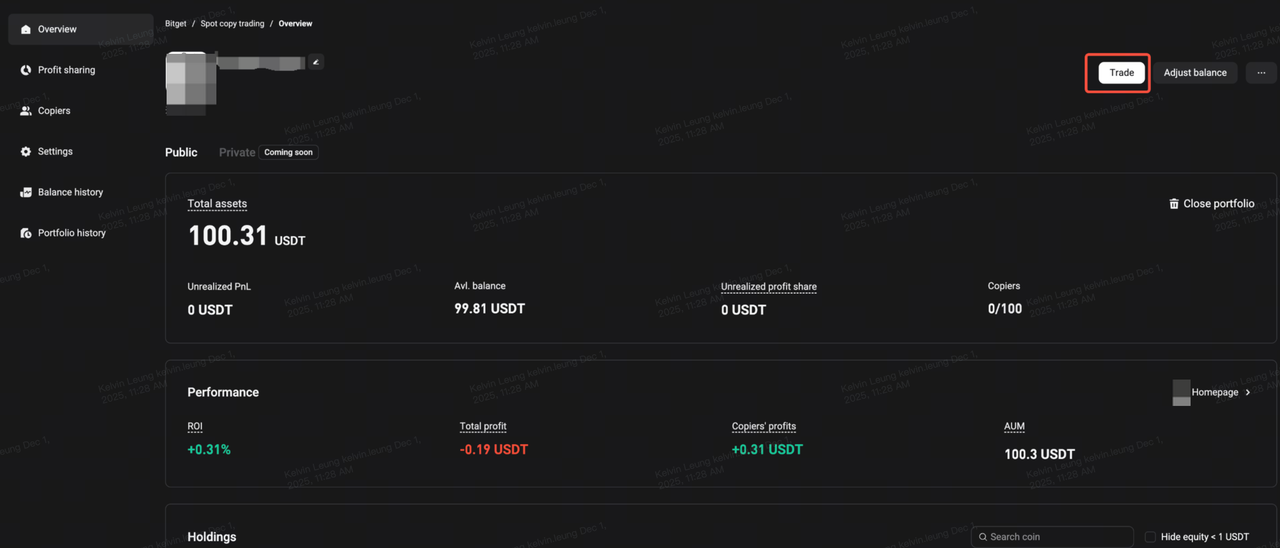
Step 2: Place your trades
1. Use the same trading interface as your regular spot account.
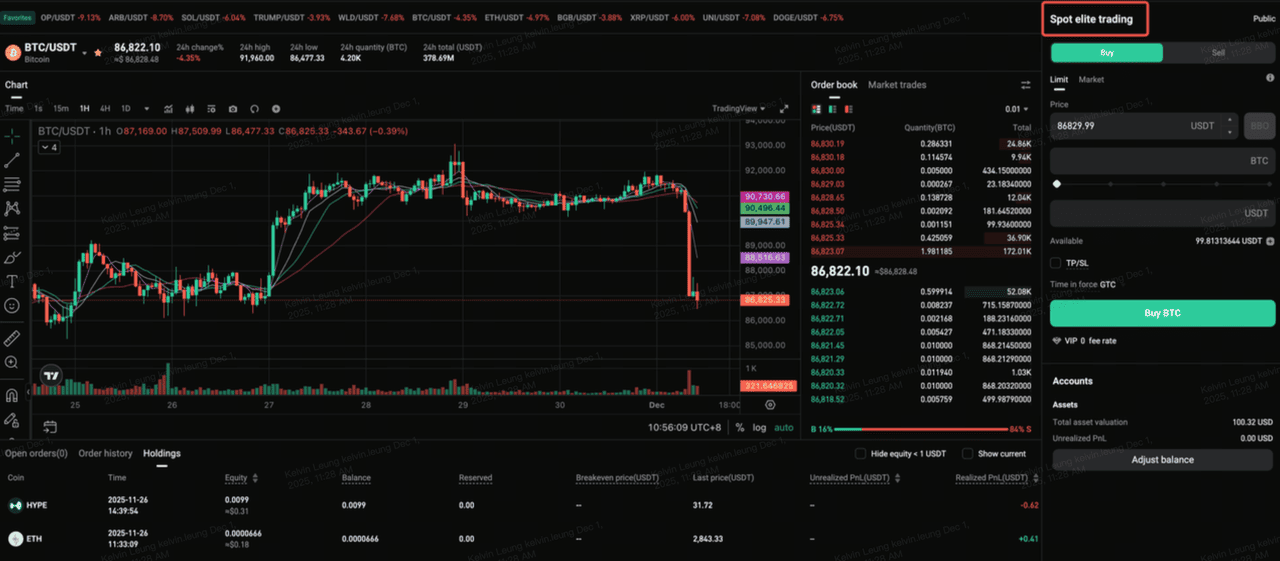
2. Confirm you're in the correct zone by checking the “Spot elite trading” label at the top right.
Notes:
-
Both market orders and limit orders are supported.
-
All orders executed in this zone are automatically mirrored by your copiers.
-
Personal trades outside this zone will not be copied.
Step 3: Monitor your open positions and holdings
1. After placing your trades in the Spot elite trading zone, scroll down to the bottom of the page.
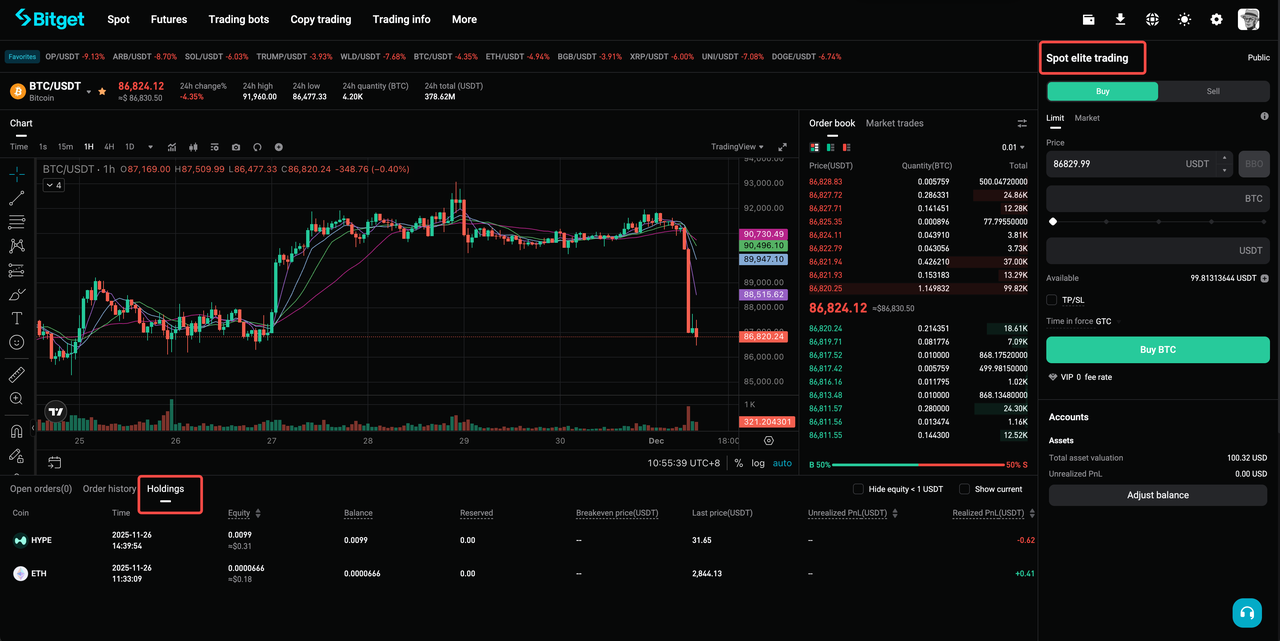
2. Click the Holdings tab to view real-time updates on your assets.
3. The Held assets panel displays real-time position data:
-
Unrealized PnL: (last price – breakeven price) × equity, with buy fees already deducted. Recalculates after each partial buy/sell and resets when the position is fully closed.
-
Realized PnL: Cumulative profit/loss from sells based on the breakeven price. Final and accurate only after the position is fully closed.
-
Breakeven price: Weighted average entry price including fees.
-
Equity: Equity = balance + reserved; last evaluation = equity × last price.
-
Balance: Balance = buy quantity – sell quantity – buy fees. Due to trading rules, a tiny residue may remain even after fully selling a coin. In that case, the position is considered closed. When you end elite trading/copy trading, any such residual asset will be automatically transferred back to your spot/funding account.
-
Reserved: Quantity locked in pending limit orders.
-
Last price: The current market price of the trading pair.
-
Hidden equity < 1 USDT: Equity below 1 USDT is hidden from display.
Note: To avoid calculation discrepancies, fully close a position to finalize realized PnL values.
How to Access Elite Trader Center?
You can access key performance metrics and portfolio controls via the Elite Trader Center:
Step 1: Go to the Elite Trader Center
1. Go to Trade > Copy > Spot copy trading
2. Click the Manage on your portfolio to open the Elite Trader Center page.
Step 2: View your portfolio overview
In the Elite Trader Center, you can track:

1. Follower Overview
-
Total number of copiers and assets copied
-
Number of active copy accounts
-
7-day retention rates
-
Profit leaderboard
2. Performance Dashboard
-
Total follower profit
-
Estimated net profit (across all copiers)
-
Cumulative invested capital
3. Profit Sharing Reports
-
Total PnL, settled PnL, unsettled PnL, and profit share details
-
Viewable by week and up to 180 days of history
4. Trading Data
-
Real-time order history and TWR (Time-Weighted Rate of Return)
-
Revenue rankings
-
Weekly income charts
-
Copy success rate per trade and trade frequency
Settlement Schedule and Conditions
Regular settlement cycle
-
Time: Every Monday at 8:00 AM (UTC+8)
-
Eligibility: Your copy trading account must have fully sold all tokens to qualify for settlement.
-
If any tokens remain unsold, your account will be skipped for that cycle but automatically included in the next one.
-
A token is considered “fully sold” if the remaining amount is below Bitget’s minimum order size.
Manual settlement triggers
Profit sharing will also be settled immediately under the following conditions:
-
You manually stop copying a trader
-
The trader removes you from their elite portfolio
-
The trader closes the entire copy project
Note: If a trading expert initiates a new copy trade before all previous settlements are processed, it may result in failed settlements for some copiers. These will automatically be included in the next cycle, and your final payout remains unaffected.
Example: How profit sharing is calculated
| Week | Weekly PnL (USDT) | Total PnL (USDT) | Settled PnL (USDT) | Unsettled PnL (USDT) | Share ratio | Profit shared (USDT) |
| 1 | 1,000 | 1,000 | 0 | 1,000 | 10% | 100 |
| 2 | -500 | 500 | 1,000 | 0 | 10% | 0 |
| 3 | 2,000 | 2,500 | 1,000 | 1,500 | 12% | 180 |
| 4 | -1,000 | 1,500 | 2,500 | 0 | 15% | 0 |
| 5 | 500 | 2,000 | 2,500 | 0 | 12% | 0 |
| 6 | 300 | 2,300 | 2,500 | 0 | 10% | 0 |
| 7 | 500 | 2,800 | 2,500 | 300 | 15% | 45 |
Maximum Number of Copiers Based on Total Assets
| Total assets (USDT) | Maximum copiers |
| 0 ≤ Total assets < 100 | 10 (default minimum) |
| 100 ≤ Total assets < 1,000 | 100 |
| 1,000 ≤ Total assets < 5,000 | 300 |
| ≥ 5,000 | 500 |
- The number of copiers you can have as an elite trader is determined by your total assets.
- Loading Sheets. Please try again after it's finished.
- You can view your current copier cap and total assets on the Elite portfolio page in the Bitget Web.
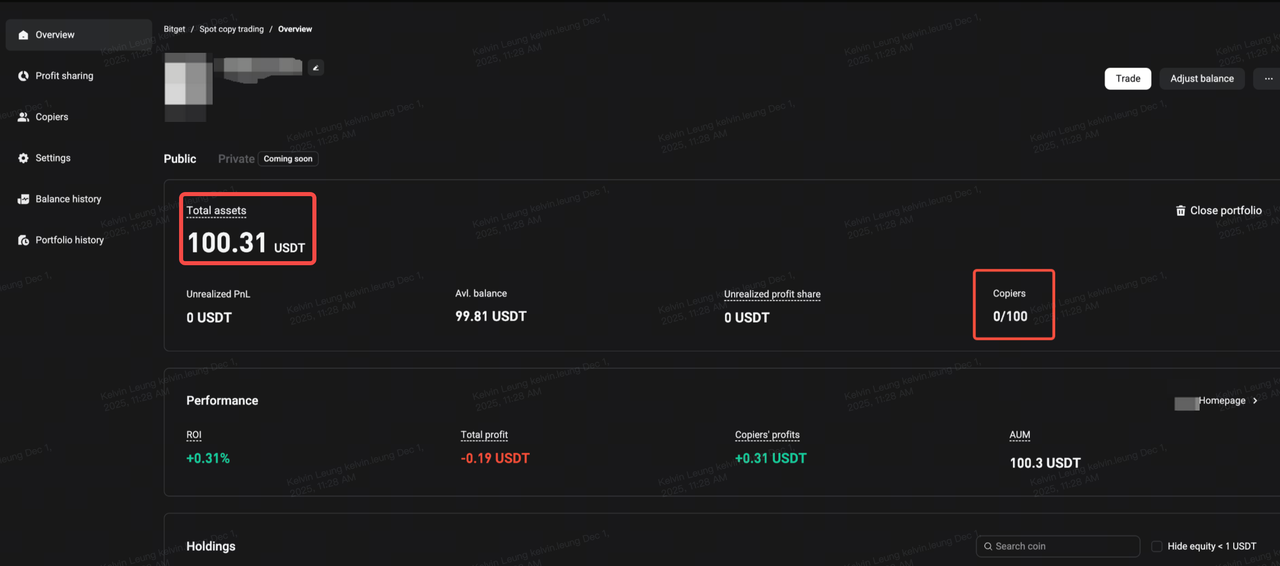
Note:
-
If your total assets fall below your current threshold, your existing copiers remain unaffected. However, new users won’t be able to follow until your total assets rise again.
-
The copier cap is refreshed automatically every hour based on your updated total assets.
What Can Cause Copy Trading to Fail?
In some cases, copy trades may not be executed due to system safeguards or trading limits.
Common reasons include:
-
Trader reaches token copy limit When the total value copied for a token exceeds platform limits, new copiers cannot buy more of that token.
-
Trader exceeds frequency cap Bitget limits traders to 1 opening trade per 3 seconds to protect copiers from slippage.
-
Trader cancels a partially filled order Only fully filled buy orders trigger copy trades. Partially filled and canceled buys won’t be copied.
-
Follower has insufficient balance If your available balance is below the minimum order size, the trade will fail.
-
Slippage exceeds limit Bitget sets default slippage limits of 0.3% for BTC/ETH and 0.5% for other tokens.
Note: If the price impact exceeds this during execution, the copy trade will be blocked.
FAQs
1. How do I become an elite trader on Bitget?
You must complete account verification (KYC) and apply through the Copy Trading section on the Bitget Website. Once approved, you’ll gain access to the Spot Copy Trading Zone and the Elite Trader Center.
2. Can I trade in my personal spot account while being an elite trader?
Yes. Your personal spot account and your Spot Copy Trading Zone are completely separate. Only trades made in the Copy Trading Zone will be copied by followers.
3. How are profits shared with me as an elite trader?
Profit sharing follows the High Water Mark model. You earn profit share only from new profits generated by copiers, not from gains already settled in previous cycles.
4. When is profit sharing settled?
Profit sharing is distributed every Monday at 8:00 AM (UTC+8), or earlier if triggered manually (e.g., when you close a project).
5. What performance data can I track in the Elite Trader Center? You can monitor:
-
Total copier profit
-
Unsettled and settled PnL
-
Profit share amounts
-
Total assets under management (AUM)
-
Time-Weighted Rate of Return (TWR)
-
Copier statistics (number of followers, retention rate, etc.)
6. Can I close my elite trader project anytime?
Yes. If you have no active positions or orders, you can close your project at any time. Historical project data will remain visible for 180 days, with order details accessible for 90 days.
7. Are there trading limits I need to follow?
Yes. To protect copier execution, Bitget sets certain limits:
-
Frequency cap: max 1 opening trade every 3 seconds
-
Token copy cap: each trading pair has a maximum value that can be copied
-
Slippage thresholds: 0.3% for BTC/ETH, 0.5% for other tokens
8. Can I remove copiers from my portfolio?
Yes. You can manually remove copiers with assets below 50 USDT from your portfolio in the Elite Trader Center.
9. What happens to residual assets when I end elite trading?
Due to trading rules, small residual balances may remain even after selling all tokens. These will be automatically returned to your spot/funding account once you close your elite trading project.
10. Why can't I transfer assets from my copy trading account to my main account?
Assets purchased through copy trading cannot be directly transferred back to your main account. You must sell all holdings in the copy trading portfolio first. Only USDT can be returned to your main account.
Disclaimer and Risk Warning
All trading tutorials provided by Bitget are for educational purposes only and should not be considered financial advice. The strategies and examples shared are for illustrative purposes and may not reflect actual market conditions. Cryptocurrency trading involves significant risks, including the potential loss of your funds. Past performance does not guarantee future results. Always conduct thorough research, understand the risks involved. Bitget is not responsible for any trading decisions made by users.
Join Bitget, the World's Leading Crypto Exchange and Web3 Company
Share